How to Reduce Cheating in Online Quizzes: A Practical Guide for Teachers
No online quiz is cheat-proof. But a few changes to how you write, set up and run a quiz make cheating harder, less tempting and easier to spot, without turning your class into a crime scene.
Online quizzes save hours of checking, and students like getting their scores right away. The trade-off is that the answers to many questions are one search, one group chat message or one AI prompt away. The good news is that cheating is rarely about one trick. It usually happens when three things line up: the questions are easy to look up, the student has time to look them up, and nobody would notice. Change any one of those, and cheating drops.
1. Write questions that are hard to search
The biggest change you can make has nothing to do with software. Questions that ask for a definition or a fact copied from the textbook can be answered by anyone with a phone. Questions that ask students to apply an idea are much harder to look up.
- Use your own examples. Instead of "What is photosynthesis?", ask "A plant is kept in a dark cupboard for a week. What happens to its food production, and why?"
- Use local and classroom details. Names of places in your town, data your class collected, or a story you told in the lesson can't be searched.
- Ask for the reason, not just the answer. A multiple-choice question followed by a short "Explain your choice" field shows whether the student understands.
- Use pictures and graphs you made. A graph you drew on the board and photographed is far harder to search than a typed question.
2. Use the settings your quiz tool already has
Most quiz tools include settings that make sharing answers less useful. In Google Forms and Microsoft Forms, look for these:
- Shuffle question order so that two students sitting together aren't on the same question at the same time.
- Shuffle answer options so that "the answer to number 4 is B" means nothing.
- Limit to one response so students can't submit again after seeing the correct answers.
- Hide correct answers until later. Release scores and answers after everyone has finished, not the moment the first student submits.
- Use question banks or sections. If you write two or three versions of key questions, different students can get different versions.
Our step-by-step guide to Google Forms quiz settings that reduce cheating walks through each one.
3. Control the time
Looking up answers takes time. A quiz that is open for a whole weekend invites research and group chats; a quiz that everyone takes at the same time, with a sensible time limit, doesn't.
- Schedule it. Have the whole class start and finish together when you can.
- Set a fair time limit. Take the quiz yourself, then give students about two to three times as long as you needed. That's enough to think, but not enough to research every question.
- Keep it short. Two short quizzes are better than one long one. Students are less tempted when less is at stake each time.
4. Make leaving the quiz visible
Most online cheating happens in another tab or another app: a search engine, a chat, a notes file or an AI chatbot. Students do it because nobody can see it. When students know that leaving the quiz is recorded, most of them simply stay.
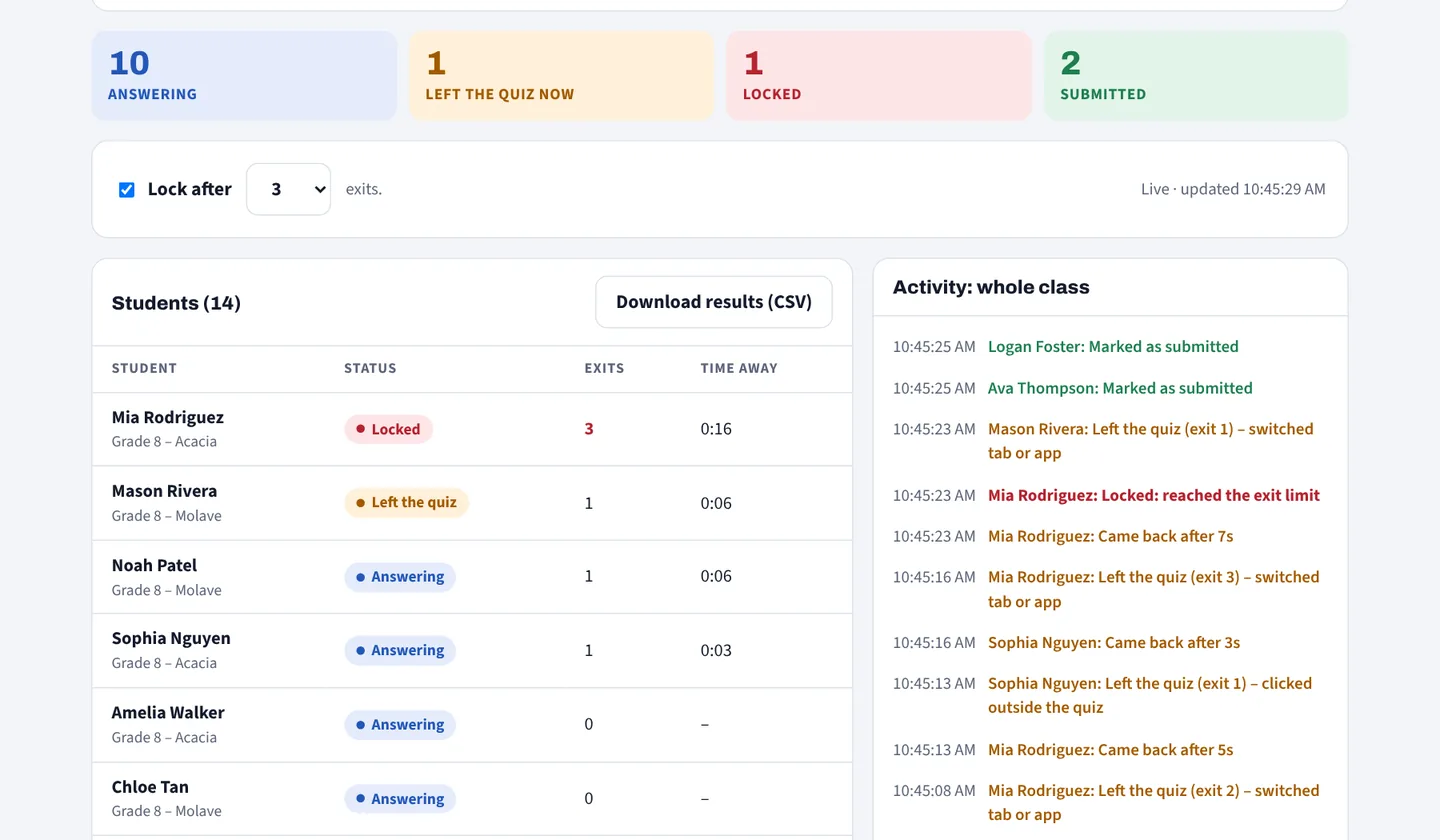
That's what QuizPolice, our free quiz monitor, does. You paste the link of your Google Forms, Microsoft Forms or Wayground quiz, and students join with a 6-digit code and their name. The quiz opens inside QuizPolice, and every time a student switches tabs, opens another app or clicks outside the quiz, your dashboard shows it live, with the time and how long they were away. You can choose how many exits are allowed before a student is locked and has to wait for you to unlock them.
Be honest about the limits of any monitor. A student with a second phone under the desk won't be caught by software. Monitoring works best as a deterrent and a record, combined with good questions and someone actually watching the room.
5. Supervise, even lightly
In a classroom, walk around. Ask students to keep phones face down or in their bags, and to keep the quiz in full screen. For quizzes at home, a short video call with cameras on is often enough to change behavior. You don't need to stare at every screen; students just need to know someone is paying attention.
6. Talk about it before the quiz
Students cheat less when they understand why the quiz matters and what happens if they're caught. Before the first online quiz of the term, explain:
- What the quiz is for. A practice quiz that doesn't count much takes away the pressure to cheat.
- What's allowed. Are notes allowed? A calculator? Be specific.
- What you'll see. "If you leave the quiz, I'll see it on my screen" is a powerful sentence.
- What happens next. Explain that you'll talk to the student first, not punish them on the spot.
7. When you see something, talk first
A student who left the quiz for 40 seconds might have been looking up an answer, or might have had a notification pop up. Treat a record as a reason to ask, not as proof. A quiet "I saw you left the quiz three times. What happened?" gives honest students a chance to explain, and it usually tells you what you need to know.
For written work, the same principle applies. Our guide on seeing the writing process explains how to look at how an essay was written instead of guessing from the finished text.
A quick checklist
- Rewrite a few recall questions as "apply it" questions.
- Turn on shuffling and one response per student.
- Hide answers until everyone has finished.
- Schedule the quiz with a fair time limit.
- Tell students what's allowed and what you'll see.
- Run it through a monitor like QuizPolice, and walk around the room.
- Talk to students before deciding anything.
None of these steps is perfect on its own. Together, they make cheating harder than studying, which is the goal.
Spotted a mistake or have a tip to add? Email [email protected]. We update our guides when tools and settings change.