Teaching When the Wi-Fi Drops: Offline-Friendly Lesson Planning
The lesson is ready, the class is waiting, and the internet is gone. It happens in schools everywhere. A little preparation means your lesson can carry on as if nothing happened.
Many schools have internet that's slow during busy hours, drops when it rains, or doesn't reach some classrooms at all. Online tools are great when they work, but a lesson that depends completely on a live connection is a lesson at risk. The goal isn't to stop using online tools. It's to make sure the important parts still work offline.
Know which of your tools work offline
Tools fall into three groups:
- Fully online. Video streaming, live online quizzes, shared cloud documents and most AI tools need a connection the whole time.
- Offline after the first visit. Some web apps save themselves in your browser after you open them once while online. Our whiteboard PizarraPad works this way: open it once with internet, and it keeps working offline in the same browser, saving your pages on your device.
- Fully offline. Files saved on your laptop or phone: PDFs, slides, videos and pictures.
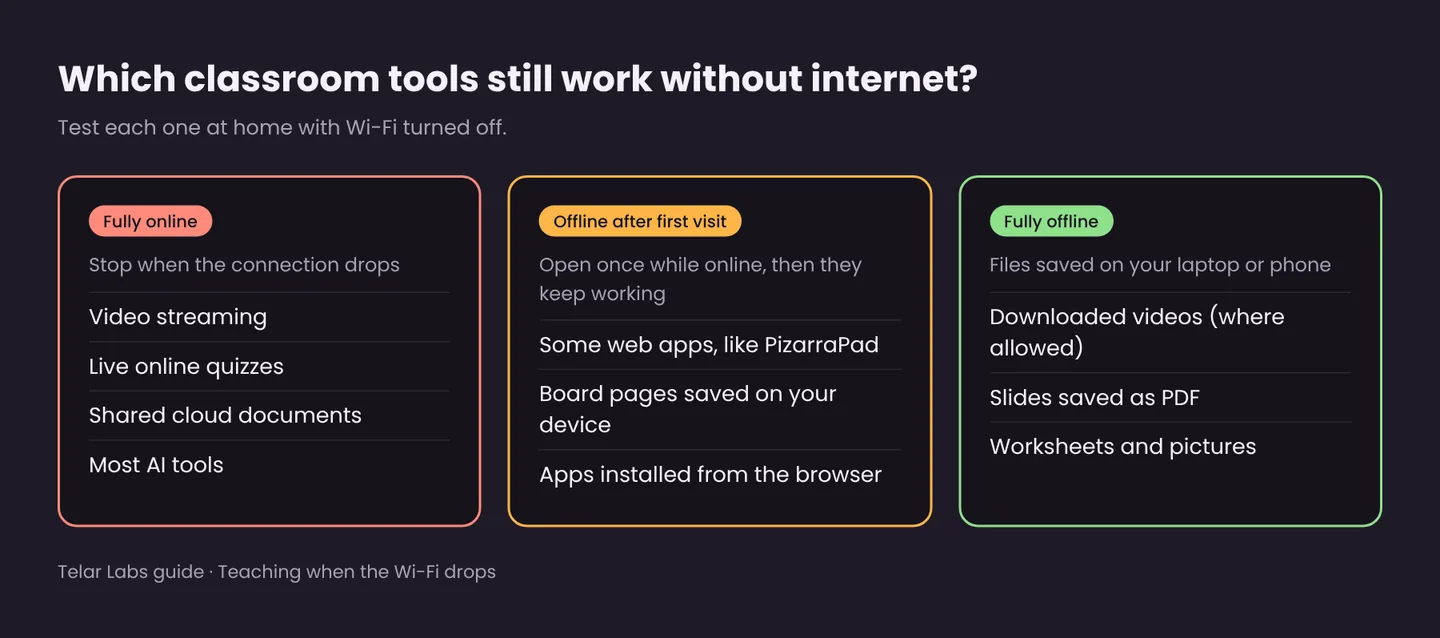
Test your tools before you rely on them. Turn off Wi-Fi on your laptop at home and try to open each one. Whatever doesn't open needs a backup.
Download before you go
- Videos. If you plan to show a video, download it the night before, if the platform and license allow. Many video platforms offer an offline download option in their apps, and many free educational video sites let teachers download clips for class use.
- Slides. Download a copy of your online slides as a PDF or presentation file, so you can present without a connection.
- Worksheets and pictures. Save them to your device, and add them to your whiteboard pages in advance.
- Maps. Take screenshots of the maps you need, or download offline maps in your map app.
Prepare your board pages ahead
A whiteboard app that saves locally lets you build the whole lesson at home. Prepare a page for the warm-up, one for each example, one for exercises and one for the exit question. In class, you just open the board and switch pages, internet or not.
For ideas, see 10 whiteboard activities for the projector classroom.
Have an offline version of online activities
For each online activity, plan a simple offline swap:
- Online quiz → the same questions shown on the board, answered on paper or with hand signals (A, B, C, D fingers).
- Research on the internet → printed or downloaded articles that groups read and summarize.
- Video → a picture or diagram from the video, discussed with questions.
- Collaborative online document → chart paper and markers, photographed at the end of class.
If an online quiz has to be postponed, keep the link ready and run it the next day. Some quiz tools let you schedule the quiz for a set time, so you can simply move it.
Use your phone as a backup connection carefully
A phone hotspot can rescue a lesson that needs a small amount of data, such as opening a quiz link. It's not ideal for streaming videos to a whole class, which uses a lot of mobile data quickly. If you use it, connect only the teacher's device, and check your data plan first.
Five-minute rescue activities
Sometimes the internet fails in the middle of an activity. Keep a few no-tech activities in your back pocket:
- Think, pair, share. Ask a question about the topic. Students think alone, discuss with a partner, then share with the class.
- One-minute summary. Students write the most important thing they learned so far.
- Question cards. Each student writes one question about the topic. Swap and answer.
- Quick quiz on the board. Five questions, answered on paper, checked together.
A simple offline checklist
- Open your whiteboard app once at home while online, and build the lesson pages there.
- Download videos, slides, pictures and worksheets to your device.
- Test everything with Wi-Fi turned off.
- Charge your laptop, tablet and phone the night before.
- Bring your adapter or HDMI cable.
- Write a one-line offline plan B for each online activity.
When the connection fails, students notice how you react more than the failure itself. With materials saved on your device and a plan B ready, a dropped connection becomes a two-second pause instead of a lost lesson.
Spotted a mistake or have a tip to add? Email [email protected]. We update our guides when tools and settings change.